FOR PUBLIC SERVANTS
Verbatim voice dictation for policy briefings, ministerial correspondence, cabinet submissions, FOI decision statements, parliamentary submissions, and meeting notes. Works in any Windows-based records system, Microsoft Word, Outlook, and departmental tools. No data stored beyond your encrypted email address. $159 USD per year. Free 30-day trial.
No credit card. Per-person licence — use it on as many computers as you work on. Reverts to the free tier after 30 days unless you upgrade.

Full Professional functionality. No credit card required.
Speech Recognition Cloud Professional is verbatim voice dictation software for Windows 10 and Windows 11 built for the writing public servants actually produce. You speak into a microphone, the words appear at the cursor in whatever Windows application is open — Microsoft Word, Outlook, your records system, your case or grants management platform, a policy submission portal, a departmental workflow tool, anywhere you can click and type. The default behaviour is verbatim: what you say is what appears, with no AI rewriting in between. The Professional plan also includes optional AI Modes you can trigger on demand if you want to tighten, formalise, or summarise a passage you have already dictated.
It is built and supported by an Australian company with 28 years of speech-technology deployment across Australian Commonwealth and state agencies, healthcare, legal, and enterprise sectors. The product is in daily use across departments and agencies in Australia, with customers across the US, UK, Canada, New Zealand, and Europe.
It works with every Windows-based government application because it dictates at the cursor at the operating-system level — not as a plugin or per-system integration. That includes the Microsoft 365 stack used across Commonwealth and state agencies (Word, Outlook, Teams, OneNote, SharePoint); the major records and document management systems (TRIM/HPE Content Manager/Micro Focus Content Manager, Objective, Records Online, SharePoint document libraries, Documentum, eDOCS); case management platforms used in operational agencies; grants administration systems; FOI workflow tools; cabinet and policy submission portals in their browser interfaces; parliamentary submission and committee secretariat tools; the standard EDRMS interfaces deployed in state and Commonwealth practice; and any other Windows application you can click into and type into. No per-system certification, no plugin to install, no per-application configuration.
The trade-off: the desktop application is Windows 10 and Windows 11 only — there is no native macOS or ChromeOS version. The Commonwealth and state government environments are overwhelmingly Windows-based, so this rarely matters in practice; for the small number of Mac-based staff, the mobile app's remote-desktop tunnelling and Voice Notes mode cover the common workflows.
$159 USD per year per person, with a free 30-day trial of full Professional functionality available through the form on this page. The licence is per person and can be used on as many computers as that officer works on — desk PC at the department, laptop for working from home, a workstation at a regional or interstate office, all on the same licence at no extra cost. Licences cannot be shared between officers because each personal vocabulary, template library, and preference set is tied to the individual account.
After the 30-day trial, the software reverts to the non-business Free tier (20 minutes per month, general vocabulary) unless you upgrade. There is no automatic charge — your card is not held, nothing renews silently. For broader deployment across a team, branch, or department, our parent business Voice Recognition Australia handles government procurement, volume licensing, and ICT panel arrangements for Commonwealth and state agencies. The 30-day trial is the standard way to evaluate fit on real workflows before broader rollout.
Voice dictation suits four government writing workflows particularly well: ministerial correspondence and constituent letters; policy briefings and cabinet submissions; FOI decision statements and the records work that feeds them; and the legal advice, parliamentary submissions, and inter-agency drafting government lawyers and senior advisors produce. Each one is covered below.
Ministerial correspondence is one of the highest-volume writing loads in government. A medium-sized policy area within a Commonwealth department will receive and respond to hundreds of ministerial and constituent letters a month — each requiring an officer to read the original, understand the issue, draft a response that is factually correct, on policy, on tone, and consistent with previous responses on the same topic, then route it through the clearance chain. The writing time per item is high; the variation between items is low.

Patterns that work for high-volume correspondence:
Substantive policy writing — briefings to the minister, cabinet submissions, committee briefs, submissions to parliamentary inquiries, options papers — is the writing where the absolute time saving from dictation is the largest, because the documents are long, the prose is dense, and the production timeline is usually tight.
Patterns that work for policy writing:
FOI decision statements are a writing profile where dictation pays off particularly well: the documents are long, structured, citation-heavy, and high in proportion of standard reasoning. A decision statement under the FOI Act or the equivalent state Right to Information legislation typically runs to 1,500 to 6,000 words and follows a recognisable structure — the application, the scope, the exemptions considered, the public interest test where relevant, the conclusion.
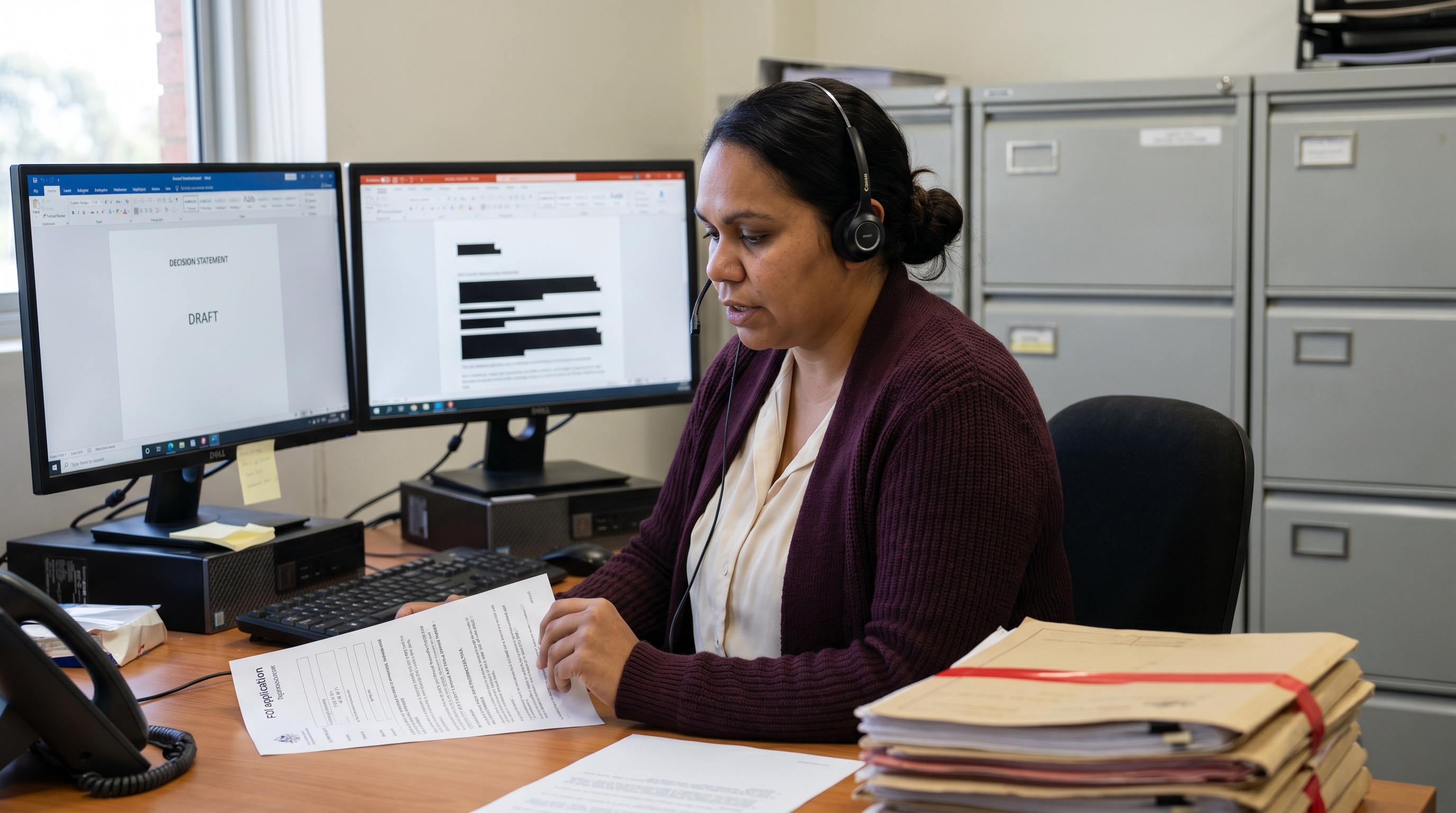
Workflows that work for records and FOI work:
Government lawyers, senior policy advisors, and the staff supporting parliamentary committees and statutory office holders produce a category of writing that is somewhere between legal advice and policy submission: dense, citation-heavy, structurally constrained, and tightly scrutinised after the fact. This is the writing where the verbatim guarantee — what you say is what appears, no AI in the data path unless you ask for it — matters most.

Workflows that work:
Speech recognition, AI policy assistants, transcription services, and meeting notetakers are different categories of product. The market discusses them as if they were interchangeable, and the resulting confusion costs departments money on the wrong tool. Worth being explicit about what Speech Recognition Cloud Professional does not do.
No. Meeting notetakers join your meetings, record both sides, and produce a transcript and summary afterwards. They are useful, and some agencies use them where appropriate. Speech Recognition Cloud is different: it transcribes your live speech into the application you are currently working in. It does not join meetings, record conversations, or transcribe other people. The meeting tool captures the meeting; Speech Recognition Cloud writes the briefing or response afterwards.
Not primarily. The default behaviour is verbatim — you speak the policy analysis, the words appear at the cursor, no AI rewriting in between. The Professional plan includes optional AI Modes (Write, Rewrite, Answer, Reply, Run Command) that can tighten, formalise, or summarise text you have dictated — but only when you trigger them on a specific passage. They do not run automatically and they cannot generate substantive policy content out of nothing. The policy officer authors the content; the software types what the officer says, and optionally tightens passages on request.
No. Speech Recognition Cloud transcribes live speech as you dictate. It does not accept audio file uploads, does not transcribe pre-recorded meetings, and does not process video files. For after-the-fact transcription of recorded consultations, parliamentary hearings, or inquiries, you want a separate transcription service. Live dictation and recorded-audio transcription are different categories of product.
No. Audio is processed in memory and immediately erased — never written to disk on our servers, never retained, never used to train any model. Transcripts are delivered to the cursor on your own computer and never copied to our servers. Custom vocabulary stays on your own device. The only thing stored anywhere on our infrastructure is your encrypted email address.
No — and it would be misleading to suggest otherwise. Speech Recognition Cloud is a productivity tool. It will make public servants faster at producing the quality of writing they currently produce. The AI Modes on the Professional plan can tighten a passage on demand, but they are not a substitute for departmental drafting standards, peer review, or supervisor clearance. Quality still comes from the writer; speed comes from the tool.
Three questions worth working through with your IT, information governance, and procurement leads before deploying Speech Recognition Cloud across a government team: what data leaves the workstation, what is stored anywhere, and how dictation fits the department's existing arrangements for handling official information.
The information-handling frameworks that govern government dictation vary by jurisdiction. The three most relevant for our visitors are covered below. Each agency should make its own determination through its IT security, information governance, and procurement processes.
REGIONAL CONTEXT — AUSTRALIA
That is a determination each agency should make under its own IT security, information governance, and procurement frameworks — including the Protective Security Policy Framework for Commonwealth entities, the relevant state government information security frameworks, and the agency's own assessment of fit for purpose. The product is designed in a way that simplifies the analysis: no departmental content is stored on our infrastructure, only an encrypted email address. Audio is processed in memory and immediately erased; transcripts are not retained on our servers; custom vocabulary stays on the officer's own device.
Australian government applications. The cursor-based approach works inside Microsoft Word and Microsoft 365 (standard across Commonwealth and state agencies); the major records and document management systems used in Australian government (TRIM/HPE Content Manager/Micro Focus Content Manager, Objective, Records Online, SharePoint document libraries, eDOCS); case and grants management systems; FOI workflow tools; the cabinet and policy submission portals in their browser interfaces; parliamentary committee secretariat tools; departmental intranets; and the workflow overlays deployed across state and Commonwealth practice. No per-system certification, no plugin, no per-application configuration.
Privacy Act and APP entities. Most Commonwealth entities and many state agencies are subject to the Privacy Act 1988 and the Australian Privacy Principles. The fact that we store no departmental content beyond the officer's encrypted email address simplifies the privacy impact assessment for this tool considerably. Our privacy and data-handling statement is the document to provide to your agency Privacy Officer for that assessment.
FOI and RTI frameworks. Voice dictation does not change what is and is not subject to the Freedom of Information Act 1982 or the equivalent state Right to Information / Government Information frameworks. The dictated document is the same document under FOI/RTI law as the typed equivalent. What changes is the time it takes the FOI or records officer to produce decision statements, schedules, and notifications.
Volume licensing and government procurement. For broader deployment across a team, branch, or department, our parent business Voice Recognition Australia handles government procurement and volume licensing for Commonwealth and state agencies. Voice Recognition Australia has been supplying Australian government for over 25 years across the Commonwealth and the states, with experience in standard government procurement processes including panel arrangements.
REGIONAL CONTEXT — UNITED STATES
That is a determination each agency should make under its own information security, privacy, and procurement frameworks — including agency-specific FISMA categorisations, NIST 800-53 mappings, the relevant state information security frameworks, and the agency's own assessment of fit for purpose. The product is not currently FedRAMP-authorised; agencies subject to FedRAMP requirements for cloud services should treat this as a constraint relevant to their own framework rather than a claim of compliance from us. What we can say is what the software actually does with data: audio is processed in memory and immediately erased, transcripts are delivered to the user's own cursor and never copied to our servers, custom vocabulary stays on the device, only an encrypted email address is stored on our infrastructure.
US government applications. The cursor-based approach works inside Microsoft Word and Microsoft 365 (widely deployed across US federal, state, and local government); records management systems (the Microsoft 365 records framework, OnBase, Documentum, and the state and local equivalents); case and grants management platforms; FOIA workflow tools; the standard departmental writing surfaces. No per-system certification, no plugin.
FOIA and state public records frameworks. Voice dictation does not change what is or is not subject to the federal FOIA or the equivalent state public records laws. The dictated document is the same document under FOIA as the typed equivalent. What changes is the time it takes records officers to produce decision letters, redaction schedules, and notifications.
State and local government. State and local agencies tend to have more flexibility on cloud-tool deployment than federal agencies subject to FedRAMP. The 30-day trial is the standard way for individual state and local government writers to evaluate fit before raising it for broader deployment.
REGIONAL CONTEXT — UNITED KINGDOM AND EUROPE
That is a determination each department or agency should make under its own information security, data protection, and procurement frameworks — including the UK government Cloud Security Principles, the relevant devolved-administration frameworks, UK GDPR, EU GDPR, and the equivalent national frameworks in each EU member state. The product is designed in a way that simplifies the data protection impact assessment: audio is processed in memory and immediately erased, transcripts are delivered to the user's own cursor and never copied to our servers, custom vocabulary stays on the device, only an encrypted email address is stored. We do not have access to government content because none is stored.
UK and EU government applications. The cursor-based approach works inside Microsoft Word and Microsoft 365 (widely deployed across UK central government and devolved administrations under the standard Microsoft 365 framework); records and document management systems (the Microsoft 365 records framework, iManage, OpenText/Hummingbird, and the standard EDRMS deployments); case management platforms; FOI workflow tools; departmental intranets. No per-system certification.
Freedom of Information Act 2000 and GDPR. Voice dictation does not change what is or is not subject to the UK FOIA or the equivalent EU member state freedom of information laws. The dictated document is the same document under FOIA as the typed equivalent. UK GDPR and EU GDPR apply to the personal data flows; the relevant question is what personal data flows where, and the simplification that helps with this tool is that no government content is stored beyond the officer's encrypted email address.
Cross-border data flows. UK departments transferring data outside the UK, and EU agencies transferring outside the EEA, need to consider the relevant adequacy frameworks (the UK-US Data Bridge, the EU-US Data Privacy Framework, and the standard contractual clauses where applicable). The simplification that helps here: there is no government content to transfer. The cross-border data inventory for Speech Recognition Cloud is essentially the officer's encrypted email address.
Languages. The Professional tier supports 57 languages, which is useful for EU agencies working in multiple member-state languages and for UK and EU multilateral and consular contexts.
Four steps, about ten minutes from install to first document: install Speech Recognition Cloud (use the form on this page for the free 30-day Professional trial), set up a microphone, open the application you do the bulk of your writing in, and dictate in plain language. Punctuation and capitalisation are automatic. The detailed walkthrough is below.
Fill out the form on this page to get the 30-day Professional trial. Install on a Windows 10 or Windows 11 computer. Plug in a USB headset, or install the mobile app on your iPhone or Android to use the phone as a wireless microphone. Allow microphone access when Windows prompts. No voice training, no enrolment, no calibration.
Open Word, Outlook, your records management system (TRIM, Objective, SharePoint), your case management or grants system, your departmental intranet, or whichever Windows application generates the bulk of your writing. Click into the document, correspondence draft, or notes area. Speech Recognition Cloud dictates directly at the cursor — no separate dictation window, no copy-paste step.
Start dictation. Speak as you would explain the matter to a colleague — for example, for a ministerial correspondence response: 'Thank you for your letter of 14 March regarding the proposed amendments to the licensing framework. I have referred your correspondence to the relevant policy area within the department, and the substantive issues you have raised have been considered as part of the current review.' Punctuation is automatic. Capitalisation is automatic. Standard openings, closings, and disclaimers inserted from saved templates with short voice commands.
Read what you dictated. Edit by voice or keyboard for any portfolio terminology, legislation references, or stakeholder names the system did not catch — add them to your personal vocabulary as you go so they transcribe correctly thereafter. File the document into your records system, send the email, or save the briefing. Most government writers describe the first few items as awkward and the workflow becoming natural within a single half-day.
If after a half-day of use it still feels slower than typing, dictation may not suit your style — and that is a useful thing to discover during a 30-day trial rather than three months in. For more setup help, see the getting-started walkthrough.
Five tips that compound across a working year: build a personal vocabulary in the first week, save your department's standard openings, closings, and clauses as templates, draft first and polish later, use the mobile app for meeting notes on the move, and read every document back before filing it. The last one is the discipline that separates officers who use dictation well from officers who get into trouble with it.
Your department's name and the portfolio acronyms, your minister's and senior executive's names, the program names and codenames you write about most often, your portfolio's legislation references, the names of standing committees and reference groups, your stakeholders' organisation names, and the small handful of policy terms the base vocabulary does not catch first time — add each to your personal vocabulary as you go. Personal vocabulary stays on your own device — never sent to or stored on our servers. Officers with a strong vocabulary culture get noticeably cleaner output across the year.
The standard opening of a ministerial response, the standard closing, your department's preferred wording for declining to comment on individual matters, the boilerplate for referring matters to other agencies, the formula for the public interest test in FOI decision statements, the standard scaffolding of a cabinet brief — save each as a named template you trigger with a short voice command. Templates and text replacements come with the Professional plan and are usually the feature that delivers the largest single productivity gain after the first week of use.
Do not try to dictate a perfect first sentence of a ministerial response or briefing. Dictate the rough version of the whole document in one pass. Then read it back and tighten. Trying to dictate polished government prose in real time slows almost everyone down, and the cool-off-and-revise pattern is exactly when policy reasoning gets verified, factual accuracy gets checked, and tone gets calibrated to the audience.
The single biggest contemporaneous-record discipline dictation offers in government is producing the meeting note while the conversation is fresh, rather than three days later when the detail has faded. Voice Notes mode on the mobile app lets you dictate the meeting note in the corridor after the stakeholder leaves, on the walk back from a parliamentary briefing, or in the car back from a regional visit. The note is waiting on your screen at the desk when you return. The compounding effect across a working year on both accuracy and accountability is significant.
This is the discipline that separates officers who use dictation well from officers who get into trouble with it. Read the document back on screen before filing it to the records system, sending it to a stakeholder, or routing it through the clearance chain — the same way you would read a typed document. The reading-back step is fast (seconds for a short note, a few minutes for a brief) and it catches the small transcription errors that occasionally carry weight in government writing: a number that came through wrong, a name that swapped, a "no" transcribed as "now," a legislation reference that picked up a stray word. The system is accurate; the writer is responsible for what gets filed.
Every feature designed around real government workflows — at the desk, in stakeholder meetings, and on the move between buildings.
The default behaviour is verbatim dictation: you speak, the words appear at the cursor, exactly as you said them. No AI rewriting in the data path unless you specifically ask for it. That matters for government writing where provenance, voice, and exactness of language matter — and where the writer needs to be able to stand behind the words because the words are theirs.
No audio. No transcripts. No custom vocabulary. No voice profiles. No dictation history. No departmental content of any kind. The only thing we store anywhere is the officer's email address, and it is encrypted. Audio is processed in memory and immediately erased. Transcripts go to your cursor and are never copied to our servers. Personal vocabulary stays on the officer's own device.
Microsoft Word, Outlook, Teams, OneNote, SharePoint, TRIM/HPE Content Manager/Micro Focus Content Manager, Objective, Records Online, eDOCS, case and grants management systems, FOI workflow tools, cabinet and policy submission portals, departmental intranets — text appears exactly where the cursor is. No separate dictation window, no copy-paste step, no plugin to install per application.
A mobile app for iPhone and Android turns the officer's smartphone into a wireless microphone for Speech Recognition Cloud on the PC. Hold your phone, dictate, and the text appears in whichever Windows application has the cursor on your computer. Useful in open-plan department offices, hot-desking environments, and anywhere a desk-mounted microphone is impractical.
Dictate completely away from your computer — in the corridor after a stakeholder leaves, on the walk back from a parliamentary briefing, in the car back from a regional visit. The transcription is created on your phone and automatically delivered to your open Speech Recognition Cloud session back at the department. The note is waiting on your screen when you return. The contemporaneous-record discipline made easy.
Save the standard opening of a ministerial response, the department's standard closing, the boilerplate for declining individual case comment, the formula for the public interest test in FOI decision statements, the scaffolding of a cabinet brief — and trigger any of them with a short voice command. The Professional plan includes Templates and Text Replacements. This is usually the feature that delivers the largest productivity gain after the first week of use.
The Professional plan includes AI Modes (Write, Rewrite, Answer, Reply, Run Command) that can tighten a long briefing paragraph, formalise a casually-drafted email, or summarise notes into a brief — but only when you trigger them on a passage you have already dictated. If you never use them, the product is straight verbatim dictation. The officer decides, passage by passage, whether AI is in the loop.
A Speech Recognition Cloud Professional licence is per person and can be used on as many computers as that officer works on — desk PC at the department, laptop for working from home, a workstation at a regional or interstate office, all on the same licence at no extra cost. The only rule: licences are per person, not shared between officers, because the personal vocabulary, templates, and preferences are tied to the individual account.
See Speech Recognition Cloud Professional in action drafting a real government document.
No audio. No transcripts. No vocabulary. No voice profiles. No dictation history. No departmental content of any kind. The only thing we store anywhere is the officer's email address — encrypted. Audio is processed in memory and immediately erased. All connections encrypted. AI Modes are on-demand only, never automatic.
Read our privacy policy →It is built for public servants whose role generates a lot of writing — policy officers and analysts drafting briefings and submissions, ministerial correspondence officers responding to constituent and stakeholder letters, FOI and records officers writing decision statements, government lawyers drafting advice and parliamentary submissions, departmental EAs and chiefs of staff producing minutes and meeting records, and the SES officers and senior managers who carry the volume of cabinet, committee, and inter-agency writing. If you spend more than an hour a day at a keyboard producing official prose, dictation usually pays for itself within the first month.
Yes. Speech Recognition Cloud dictates at the cursor in any Windows application — Microsoft Word, Outlook, Teams, OneNote, and the rest of the Microsoft 365 stack; records and document management systems (TRIM/HPE Content Manager/Micro Focus Content Manager, Objective, Records Online, SharePoint document libraries, Documentum); case management and grants systems used across Commonwealth and state agencies; the policy and cabinet submission portals in their browser interfaces; departmental intranets and workflow tools; and any other Windows application you can click into and type into. No per-system certification, no plugin to install, no per-application configuration.
No. The only thing we store is the user's email address, which is encrypted. No audio. No transcripts. No custom vocabulary. No voice profiles. No dictation history. Audio is processed in memory and immediately erased — never written to disk on our servers, never retained, never accessible to our staff. Transcribed text is delivered to the cursor on your own computer; we do not retain a copy. Custom vocabulary stays on the device. There is no departmental content of any kind on our infrastructure because there is nothing for us to store.
Not by default. The default behaviour is verbatim — you speak, the exact words you spoke appear at the cursor. The Professional plan also includes optional AI Modes (Write, Rewrite, Answer, Reply, Run Command) that can rewrite, tighten, or summarise a passage of text you have already dictated — but only when you trigger them on a specific passage. AI Modes do not run automatically and they cannot generate substantive content out of nothing. Most government writers use them sparingly: occasionally to tighten an over-long briefing paragraph or formalise a stakeholder email, rarely on substantive policy content. You decide, sentence by sentence, whether AI is in the loop.
No. Speech Recognition Cloud is licensed per person — each officer needs their own licence because the personal vocabulary, templates, and preferences are tied to the individual account. The licence can be used on as many computers as that person works on — desk PC at the department, laptop for working from home, a workstation at a regional office, all on the same licence at no extra cost. The constraint is one person per licence, not one device per licence. For team rollouts, the usual pattern is to issue Professional trials to a small pilot group across different work units before broader deployment.
30 days of full Professional functionality, free, accessed through the form on this page. No credit card required. After 30 days, the software reverts to the non-business Free tier (20 minutes of dictation per month, general vocabulary) unless you upgrade. There is no automatic charge — your card is not held, nothing renews silently. You either choose to upgrade to Professional or the software stays on the Free tier.
The Speech Recognition Cloud desktop application is Windows 10 and Windows 11 only — Mac support is on our roadmap with no current ETA. The Australian Public Service and most state government departments standardise on Windows, so this rarely surfaces as a deployment issue. For the small number of staff on Macs — typically design, communications, and some technical staff — the mobile app tunnels audio through remote-desktop connections, so a Mac user remoting into a Windows session can dictate normally; and Voice Notes mode delivers transcribed documents to a shared Windows PC, which works for ad-hoc dictation.
Two things. First, it turns your iPhone or Android into a wireless microphone for Speech Recognition Cloud on your PC — useful in open-plan department offices and hot-desking environments where a desk-mounted microphone is impractical. Hold the phone, dictate, and the text appears in whichever Windows application has the cursor on your computer. Second, Voice Notes mode lets you dictate completely away from your computer — between meetings in another building, after a stakeholder visit, walking back from a parliamentary briefing — and the transcription is automatically delivered to your open Speech Recognition Cloud session back at the desk. The meeting note is waiting on your screen when you sit down.
The base vocabulary handles general policy language comfortably. For the things every department does differently — your portfolio's legislation references, internal program acronyms, your stakeholders' organisation names, the policy initiatives in your area, departmental codenames, the names of standing committees and reference groups — you build a personal vocabulary as you go. Add a term once and it transcribes correctly from then on. Most policy officers have a reasonable personal vocabulary set up by the end of their first fortnight.
A USB headset gives the cleanest results for desk-based work and is the usual choice for officers in their own offices or quieter team areas — anything in the $40 to $120 range works well. For open-plan environments, hot-desking, and the increasingly common shared-workspace setups, the mobile app on your own smartphone is often the better answer — directional, always with you, no shared desktop hardware. For staff on the move between buildings, stakeholder meetings, and regional visits, the mobile app is the only practical option.
Not necessarily for trial use — the 30-day Professional trial is free and accessed by the individual officer through the form on this page. For broader deployment across a team, branch, or department, our parent business Voice Recognition Australia handles government procurement, volume licensing, and ICT panel arrangements for Commonwealth and state agencies. Contact us through the form on this page if your department is considering coordinated rollout and we can route the conversation appropriately.
Built-in Windows and Microsoft 365 dictation is adequate for casual use. The differences professional users notice with Speech Recognition Cloud: it dictates at the cursor in every Windows application rather than only Microsoft surfaces; automatic punctuation works without spoken commands; templates and text replacements trigger paragraphs of boilerplate with a short voice phrase; custom vocabulary persists across applications; and the optional AI Modes handle rewriting and summarising on demand. For light dictation, built-in tools are adequate. For high-volume policy and correspondence writing, the workflow gains compound across the year.
For more setup answers, see the support FAQ.
Verbatim dictation for briefings, ministerial correspondence, FOI decision statements, and parliamentary submissions. No credit card. Per-person licence, unlimited computers. Fill out the form above to get started.
Get started free